Microsoft Network Connection Internet Test Alternative
Download and import the registry file below to make your Windows PC use test.dynamix.run rather than msftncsi.com as its online internet checking service.
This registry file overwrites the default Microsoft ActiveWebProbeHost registry setting and uses Dynamix instead.
Get your network connections to show up as connected to the internet:
Windows 10 from this  to
to 
Windows 7 from this 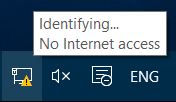 to
to 
Download Internet Test Alternative Registry Fix
Restart your PC after applying this registry fix for the changes to take effect!
Works on Windows 7, Windows 8 / 8.1, Windows 10, and Windows 11
Remove your PC's dependency on Microsoft. Use our service instead. No data or telemetry is collected by our connected to the internet checking service.
To revert back to the default settings, download and import this registry file containing the original Microsoft defaults and then reboot your PC.
Get free dynamic DNS services provided by Dynamix.